0%

Choosing a Smart Dictionary Scan Pen can feel simple until you compare language coverage, scanning speed, and offline features. A device may read a printed sentence quickly but struggle with small fonts, glossy pages, or uneven lighting. For buyers across different regions, these details matter as much as the product’s headline features.

A useful buying decision starts with real tasks. Consider whether the pen will support language learning, travel, classroom reading, or workplace reference. Check its supported languages, pronunciation options, screen readability, battery life, and file-transfer methods. Test how it handles a short line of text, a bold heading, and a word near the page margin. Small details matter. Also confirm whether key functions work without Wi-Fi, since connectivity can be unreliable during travel or in older buildings.

Price alone tells little. Compare warranty terms, software updates, local service options, and clear instructions in a language you understand. Reviews can help, but check whether they describe the same model and firmware version; product names sometimes hide meaningful differences. A scan pen may save time, yet it will not always interpret context correctly. That limitation deserves a little humility, especially when translating technical or unfamiliar material. The tips in this guide offer a practical way to assess features, avoid common buying surprises, and choose a device suited to your reading habits and budget. No single model fits everyone, and a careful comparison may still leave a few unanswered questions.
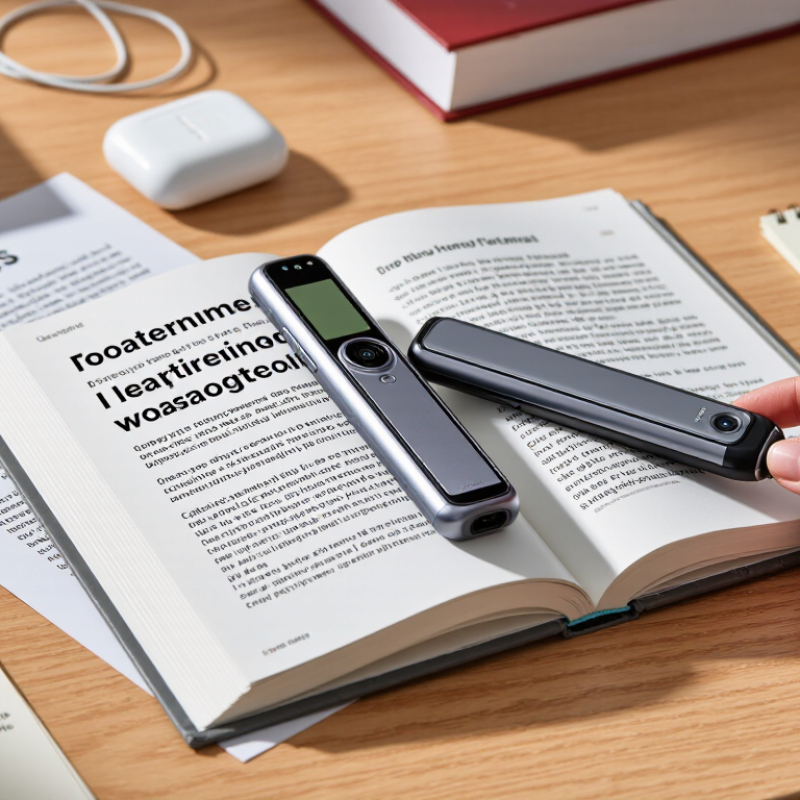
10 Smart Dictionary Scan Pen Buying Tips for Global Buyers

What a Dictionary Scan Pen Is and How Its Core Features Work

A dictionary scan pen is a handheld reader that captures printed words through a small optical sensor. As you slide its scanning window across a line, the sensor records letter shapes and software converts them into digital text. The process is called optical character recognition, or OCR. Clean print and steady movement matter.

After recognition, the pen searches a built-in dictionary and displays a definition, translation, or example. Some models can also speak the scanned word through a small speaker or headphones. Listen closely. Pronunciation quality varies, and a screen may show only brief explanations. Check which language pairs and accents the device supports before buying.

For a practical test, scan a word from a paperback under ordinary room lighting. Curved pages, small type, and glossy paper can cause missed letters, even on capable devices. Not magic. Offline dictionaries can help when Wi-Fi is unavailable, but their entries may be less complete than online resources. Buyers should also check battery life, font readability, and whether the pen requires a particular scanning direction. Real-world performance can differ from a quick demonstration, so a return policy is useful.

What a Dictionary Scan Pen Is and How Its Core Features Work

A scan pen typically captures printed text, uses optical character recognition (OCR) to identify it, searches a built-in dictionary, then displays or reads the result aloud. This chart shows the usual sequence, not processing time; available features vary by model.

How to Match Language Support and Scanning Accuracy to Your Needs

Language support is not just a menu count. CSA Research’s 2020 Can’t Read, Won’t Buy study surveyed 8,709 consumers in 29 countries. It found that 76% preferred product information in their own language. Forty percent would not buy from a website in another language. This was not a scan-pen test, but it highlights the cost of poor language matching. Check whether the pen handles your language pair, regional spelling, accents, and offline lookup. A listed language may support translation but not text scanning.

Ethnologue’s 2024 edition catalogued 7,164 living languages, so no device can cover every buyer’s needs. Test your likely reading material before choosing. Scan a page from a textbook, a small-print label, and a sign with accented words. Try at least 100 words, then count exact matches; check dictionary results separately from recognition. Look for dropped endings, split words, and confusing punctuation. Try it slowly. A claimed accuracy percentage may use clean sample text, not your everyday pages. Ask how that figure was measured, and whether it applies to your language pair. One limitation is easy to miss: a pen may read words correctly yet return an unsuitable definition or pronunciation.

How to Compare Dictionary, Translation, and Learning Functions

10 Smart Dictionary Scan Pen Buying Tips for Global Buyers
How to Compare Dictionary, Translation, and Learning Functions

When comparing a dictionary scan pen, assess its three jobs separately: word lookup, sentence translation, and learning support. A strong dictionary function should show clear definitions, parts of speech, and useful example sentences. Check whether it works offline, especially when travel or classroom Wi-Fi is unreliable. Try scanning a small printed word, not only large sample text.

Translation quality depends on the languages and text you actually use. Test a short sentence with punctuation, accents, or a familiar idiom. Compare the result with a trusted human translation when accuracy matters; fluent wording can still miss context. Also check supported language pairs, scan speed, and whether the device reads results aloud. Small print can expose weak recognition.

Tips: Bring a page with different fonts to a store or test the return window. Scan a textbook paragraph, then review saved words and quizzes. Useful learning tools should let you revisit mistakes without making practice feel like a chore. I would not assume more features mean better learning; honestly, some menus can distract from the basic lookup.

10 Smart Dictionary Scan Pen Buying Tips for Global Buyers - How to Compare Dictionary, Translation, and Learning Functions

No. Buying Factor Dictionary Function Translation Function Learning Function What Buyers Should Check
1 Supported languages Check which languages are available for scanned-word definitions and example sentences. Confirm the exact source and target language pairs; translation support may vary by direction. Look for pronunciation and study tools in the languages the learner actually uses. Verify language pairs in the product documentation. Do not assume that a language listed for translation is also supported by the dictionary or speech features.
2 Dictionary quality Compare definition clarity, parts of speech, example usage, and coverage of common vocabulary. A dictionary lookup can help explain a word, but it is not the same as translating a full sentence. Contextual examples can help learners understand how a word is used. Test a few familiar words, including words with multiple meanings, and check whether definitions and examples suit the intended age and proficiency level.
3 Text scanning accuracy Accurate character recognition helps the pen find the intended headword. Translation depends on correctly recognizing the printed text before processing it. Reliable scanning reduces interruptions during reading practice. Test different font sizes, punctuation, columns, and text weights on materials similar to those the user will read. Recognition results can vary with print quality and scanning technique.
4 Printed-text compatibility Check whether the device can handle the scripts and text layouts used in your books or documents. Some language pairs and layouts may be more challenging to scan than others. Compatibility with textbooks and reading materials matters for regular practice. Check supported scripts and scan direction. Try the pen on representative pages, especially where text is small, curved, closely spaced, or printed in multiple columns.
5 Offline availability Some models provide selected dictionary content without an internet connection. Offline translation may be limited to certain languages or functions. Offline word review can be useful where connectivity is unreliable. Ask which functions work offline, which language packs must be downloaded, and whether setup or updates require internet access.
6 Sentence translation Dictionary results usually explain individual words rather than the meaning of an entire passage. Check whether the pen translates single words, lines, or longer passages, and how results are displayed. Comparing a translation with the original can support reading comprehension, but should not replace learning the vocabulary. Test short, complete sentences and inspect the output for meaning, punctuation, and context. Translation quality can differ by language pair and sentence structure.
7 Pronunciation and audio Audio pronunciation can help users hear a word after looking it up. Some devices can read translated text aloud, depending on language support. Playback and repeat options can support listening and speaking practice. Check which languages have audio, whether playback uses a built-in speaker or headphones, and whether volume is suitable for the intended setting.
8 Vocabulary and review tools Saved words can make dictionary lookups easier to revisit. Translation history may help users find previous results, if included. Flashcards, word lists, quizzes, or review scheduling can support repeated practice. Check whether words can be saved, organized, exported, or reviewed later. Confirm that the learning tools match the user’s study habits rather than relying on feature names alone.
9 Ease of use and display Definitions should be readable and quick to access while scanning. Translation results should be easy to distinguish from the original text. Clear menus and simple controls can make independent practice easier. Review screen readability, navigation steps, text-size options, and the process for correcting or repeating a scan. If possible, try the interface before purchase.
10 Battery, storage, and support Downloaded dictionaries and saved entries may use device storage. Offline language packs can also require storage space. Longer use between charges may suit frequent study sessions. Compare stated battery life under the manufacturer’s test conditions, storage capacity, charging method, update policy, warranty terms, and local customer support.

How to Check Device Compatibility, Connectivity, and Data Privacy

Before buying a dictionary scan pen, check which operating systems it supports. A device may work with Windows but not with a particular tablet or phone. Ask whether it needs an app, and check the app’s minimum system requirements. If possible, test a sample page with small print, accents, and a second language. A clean demonstration matters. So does ordinary handwriting nearby, which can confuse some scanners.

Connectivity affects daily use. Check whether the pen works offline, or needs Wi-Fi or a phone connection to translate scanned text. Try pairing it in a quiet room, then consider where you will use it: a crowded classroom can make wireless setup less convenient. Ask how updates are delivered and whether core dictionary functions remain available if the connection drops. These details can be easy to overlook.

Treat privacy claims carefully. Find out whether scans stay on the pen, move to an app, or are uploaded for processing. Read the permissions before enabling microphone, contacts, or location access; a dictionary tool may not need them all. Check whether the seller explains data retention, deletion, and security measures in plain language. I would not assume that “offline” means every feature stores nothing. That deserves a closer look. If answers are vague, pause before sharing schoolwork or personal notes.

How to Evaluate Suppliers, Certifications, Warranty, and Total Cost

A smart dictionary scan pen is a small device with a surprisingly long supply chain. McKinsey’s 2024 supply-chain risk survey found that nine in ten respondents had faced supply-chain challenges in the previous year. That is not a pen-specific statistic, but it makes supplier resilience worth checking. Ask who assembles the device, where key components come from, and how defects are handled.

Request recent sample units and test reports that match the exact model, not a similar product. Paperwork matters.

Check that certifications and safety documents fit your destination market and product configuration. A certificate for a different model or factory may offer little reassurance.

For warranty terms, confirm the coverage period, battery exclusions, replacement process, and who pays return shipping. Get these details in writing. A one-year warranty can sound solid, yet slow email replies or costly returns can weaken its value.

Tips: Compare landed cost, not just unit price. Add sample fees, freight, duties, packaging, spare parts, and expected warranty claims. Ask suppliers to quote the same order quantity and delivery terms. Keep one sample for a practical check: scan small print, test several languages, and try it under ordinary office lighting. This is imperfect evidence, but it can expose usability issues before a large order.

FAQS

How does a dictionary scan pen read printed words?

Its optical sensor captures letter shapes as you move the scanning window across a line. OCR software turns those shapes into digital text. Steady movement helps.

How accurate is scanning on ordinary printed pages?

Clean, large print usually gives the pen a better chance. Curved pages, glossy paper, and small type can lead to missed letters. Not magic. Try a paperback under normal room lighting.

Can the pen translate words or speak them aloud?

Many devices show definitions, translations, or examples. Some also play pronunciation through a speaker or headphones. Audio quality varies, so check supported languages and accents.

Will an offline dictionary work without Wi-Fi?

Some pens keep dictionary entries on the device and work without a connection. Offline entries may be less complete than online resources. Check which features remain available when disconnected.

How can I check whether a pen works with my computer or phone?

Confirm its operating system support and whether it requires an app. Check the app’s system requirements, then test small print, accents, and another language if possible.

What should I check about connectivity and privacy?

Find out whether scans stay on the pen, move to an app, or get uploaded for processing. Review app permissions and data deletion details. Vague answers deserve a closer look.

What should I ask a supplier before placing a larger order?

Request samples and test reports for the exact model. Ask how defects are handled, and get warranty coverage, battery exclusions, replacement steps, and return shipping costs in writing. Paperwork matters.

How do I compare the full cost and practical performance?

Add sample fees, freight, duties, packaging, spare parts, and expected warranty claims to the unit price. Test scanning under ordinary office lighting. One sample is imperfect evidence, but it can reveal usability problems.

Conclusion

Choosing a Smart Dictionary Scan Pen starts with understanding how it captures printed text and turns it into definitions, translations, or spoken output. Compare supported languages and test scanning accuracy with the text types you expect to use, such as books, worksheets, or documents. Consider whether the built-in dictionary, translation tools, pronunciation support, and learning features suit your goals, rather than relying on a long list of functions you may not need.

Before buying, check compatibility with your devices and operating systems, along with available connectivity options and how personal data is stored or handled. Evaluate suppliers by reviewing product documentation, relevant certifications, warranty terms, customer support, and replacement policies. Finally, compare the total cost, including accessories, subscriptions, shipping, and potential maintenance. A careful assessment of these factors can help global buyers select a reliable scan pen that fits their language needs, budget, and daily use.

Julian

Julian

Julian is a professional marketing specialist with a strong understanding of product strategy, customer needs, and market development. As a valued member of our team, he combines practical marketing experience with in-depth knowledge of the company’s products, services, and industry applications.......